Tuesday, 21 February 2017
Saturday, 24 December 2016
Samsung Gear S3 common quesitons and answers
- What is the difference between the frontier and classic?
Styling is the main difference. They both measure the same (46.1 x 49.1 x 12.9mm), while the Frontier is a shade weightier at 62g to the Classic's 57g. The Frontier is the more rugged looking and comes with a rubberised strap as standard, while the more classic looking Classic comes with a black leather strap as standard. However, both models can accept any 22mm standard watch strap - not just those provided by Samsung.The Frontier has larger, textured buttons, which resemble more the sportswatch-like design compared to the more protruding metal buttons of the Classic. Features are identical for both. But just because the Frontier looks the sportier model, doesn't mean it comes with a sportier feature set. Indeed both Gear S3 models are IP68 dust-proof and water-resistant, and both feature built-in gyro, accelerometer, barometer, GPS and optical heart-rate monitor. So both Frontier and Classic are capable of fitness and tracking - a feature Samsung is keen to push with its S Health app. In some territories (only in USA at the moment) a second version of the Frontier will come equipped with LTE/3G for on-the-go connectivity. The batteries are also the same so battery will be very similar. Both Gear S3 models are controlled by a combination of rotational bezel, twin buttons and touchscreen. In summary, then, the Frontier and Classic aren't hugely different at all. Their feature set only differs by the Frontier's addition of 5g weight, its different strap and the more rugged looking, sportier design.
- Is the watch really that big?
This watch is 46mm. It looks large on a man and giant on most female wrists. I am 170cm of average build and I think it looks fantastic (to my eyes) on my wrists. The S2 will still be on sale of if you want a smaller watch, that’s the choice.
- Is it easy to switch band?
Super easy, the frontier comes with silicon bands and classic comes with leather bands. There are two in the box, big and small. It’s takes standard 22mm bands so no limitation here.
- Can you make and receive calls?
Yes! It has built in speaker and microphone, both classic and frontier, LTE or non --LTE. The speaker loud and clear, but definitely not super high quality - perfect for calls, not so perfect for music. The microphone is decent, caller on the other end said it’s similar to regular phone. Non-LTE versions make calls through your phone via Bluetooth.
- Can I receive and send message?
Yes, you can receive or send using the onscreen keyboard or S-voice.
Can I read my notification? Such as emails, text messages, etc.
Yes, definitely. Also, notifications from any other apps that you choose.
- Does it have LTE?
This is where everything gets confusing. There are two versions of Gear s3, classic and frontier. The former is a definite no no. for frontier, currently only the one from AT&T in US has LTE and no LTE everywhere else, whether this can be enabled via a software update, no one knows.
- Can music be loaded onto the watch and played via Bluetooth headphone without phone?
Yes, you can load music on this. There is 4GB of internal storage for apps and music, which can be played via Bluetooth or speaker. However, only about 1.5G is available for music without installing any app.
- Dose it track sleeps automatically?
- Will it track stairs climbed?
It tracks floors, not necessarily stairs climbed. It uses the altimeter to measure increase in elevation.
- Will it work with an Iphone?
Yes but it’s not perfect, there is a beta Tizen\Samsung software. It does have its limitations but it will sync.
- As an Iphone user, can I use it with out phone?
Not the best idea. The Gear S3 performs its initial set up and firmware update using an android device and was designed specifically for Samsung smartphones. It is recommended that you use a compatible device to take advantage of all the features of this device. However, once the device has gone through initial setup, it may be used alone or simply paired with Bluetooth to any device.
- Will Samsung Pay work?
In USA, yes. UK, not yet.
- How long will the battery last during moderate use?
People definition of "moderate" varies so it's hard to say for sure. I have email, text, occasional phone calls, two 5K with GPS and it last around 2-3 days.
- Does it has Spotify?
Yes, it just become available.
- Can you connect this and a Bluetooth headphone to a phone at the same time?
Yes, I connected the watch and a BT head phone to my S7. I can play music on the phone and my watch to pause, forward or stop music and also make or answer calls.
The watch still gets notification.
- It’s there continues heart rate monitor?
Yes, at rest, it will measure heart rate every 10 minutes. It will delivery continuous tracking and heart rate readings during exercise.
- Can it recognize workout automatically?
Yes, it will picking up walking sessions, runs and even rowing machine sessions and it’s fairly accurate.
- Does this have a smart alarm feature or app. One that will wake you up close to a scheduled time when you are out of a deep sleep?
Yes, it does have an alarm feature which provides both sound and vibration. It should get you out of your slumber. For smart alarm, you can always download Sleep as Android.
- Can I set up and update a Samsung Gear S3 watch with a Samsung or other android tablet instead of an android watch?
Yes, as long as you can download the Samsung gear App, You can. But the functionalities will be limited like phone calls text messages. Emails, S health, watch faces and other notifications will work.
Wednesday, 21 December 2016
Samsung Gear S3, The facts in a list
- The Samsung Gear S3 features a 1.3-inch screen with a 46mm body and 360 x 360 super AMOLED, always-on, screen with optimal view to easily glance the time or check your notifications
- Minimalistic, analogue look with its 316L stainless steel body, Gorilla Glass SR+, and circular buttons next to the brushed metal rotating dial
- Full colour always-on watch display features a crisp watch face with a second hand - like a real luxury analogue watch but with more practical features
- 4GB of storage allows you to directly download apps from the Gear S3, save audio files, and import contacts and events from your phone
- With the built-in speaker, you can play music and sound alarms and notifications
- The built-in microphone allows you to control the Gear S3 with S Voice, set reminders, answer calls or send text message replies
- The Gear S3 automatically recognises your activity, whether you are running, walking, cycling, or using the elliptical and rowing machines with auto-activity detector.
- IP68 certification to withstand dust and dirt and up to 1.5 meters of water for up to 30 minutes so that you don’t have to take it off even during the toughest outdoor experiences
- Built-in GPS and GLONASS for accurate location tracking that can be used for turn-by-turn navigation, identifying your current location, and sharing your location in emergencies
- Quickly send clear SOS messages in an emergency. You can share your location as the Gear S3 has a built-in GPS
- Longer battery that lasts three to four days with full charge*. You can use it for 10 hours after just 15 minutes of charging. If the battery is too low (less than 5%), you can keep using it as a standard watch.
Tuesday, 20 December 2016
2016-12-20, Living with Samsung Gear S3-model selection, unboxing, and first impression
I have always been a massive smart watch fun and have owned the original pebble, Moto 360 Gen I, and Sony Smart watch 2.
I still own Moto 360 Gen II and Garmin forerunner 235 and wear them on separate occasions.
The Moto is my day to day driver as it looks like a normal watch and doesn’t make me look like a geek, although I am undoubtedly the biggest geek in my social circle. However, I can’t really use it for sports as it lacks GPS and the battery life is rather short. I use Garmin for sports activities, mainly running, hiking and biking, with it fast GPS, good sports tracking function and long battery life but its styling means I can’t wear to work or dinner parties.
Samsung gear S3 come into play as the perfect combination of the two. I have always been using Android wear due to the number of apps available. However, the current version of android wear on my moto left a lot to be desired and based on the reviews, Tizen has really grown over the years. Most importantly, the 4-5 day battery life is immensely impressive, my Moto’s can barely last for 1 day. In addition, built-in GPS (and the array of sensors) for sports tracking, ingenious rotating bezel, off-line music play, the beautiful AMOLED display, all make the gear S3 an ultimate smartwatch.
There are two versions of Gear S3, the more rugged Frontier for outdoor types and the Classic, which aims to be the more luxurious option of the two. Underneath, the two versions are exactly the same. Both are made of stainless steel, both are IP68 certified water resistant (which means you can submerge it in water of up to 1.5 metres for up to 30 minutes. You can't use it for swimming or diving though). Apple watch wins here. Both have the same internals(there is a LTE enabled Frontier version but I don't think you can buy it in UK), same sensors and both run Samsung's Tizen OS.
Unboxing video:
Unboxing video:
As I am no where near a sports enthusiastic and love the minimal look of the Classic, it's the one I prefer and I think I made the right choice when I received it.
The watch is big, it's a lot bigger than my Moto GII but the bigger size means a bigger screen that can fit in more content. I am 170cm and of average build.
The S3 comes with a large leather band with a small one in the box. The bands are standard 22mm watchbands and is very easy to change.
Wireless charging makes the S3 a perfect desk clock. The charging cable is rather short but it's standard micro USB so can be replaced.
The watch is big, it's a lot bigger than my Moto GII but the bigger size means a bigger screen that can fit in more content. I am 170cm and of average build.
The bezel has grooves on its outer perimeter that makes it easier to rotate the bezel. Rotating the bezel gives a satisfying click but I wish the bezel was a bit thicker as it's not that easy to grip.
The S3 comes with a large leather band with a small one in the box. The bands are standard 22mm watchbands and is very easy to change.
Wireless charging makes the S3 a perfect desk clock. The charging cable is rather short but it's standard micro USB so can be replaced.
Thursday, 20 October 2016
Enable Task Manager disabled by Administrator or Virus in Windows
indows Task Manager is used to view details about processes running on your computer. Since it can be used to terminate programs that are misbehaving or are viruses disguised in the form of harmless programs, most spyware and viruses disable it to prevent themselves from being closed through it. Some administrators also disable Task Manager to prevent users from closing important security programs like antiviruses and anti-malwares.
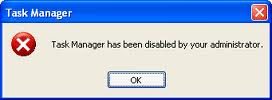
In such situations, running the Task Manager will give the "Task Manager has been disabled by Administrator" error. However, there are some techniques you can use to re-enable task manager and close those harmful programs manually. This article contains few such simple techniques you can use to regain access to Task Managing privileges.
Group Policy Editor is a feature in Windows which is used to edit local policy settings. It can also be used to enable Task Manager. To do so, just follow the steps given below:-
In such situations, running the Task Manager will give the "Task Manager has been disabled by Administrator" error. However, there are some techniques you can use to re-enable task manager and close those harmful programs manually. This article contains few such simple techniques you can use to regain access to Task Managing privileges.

Enable Task Manager from Registry in Windows 10, Windows 8, 7, or XP
Registry Editor is an inbuilt Windows tool that is used to modify registry keys which tell Windows how it should work. A simple registry modification can be used to bypass the Task Manager block. To do so, just follow the steps:-- Click on Start. Go to Run. Alternatively, use Windows key+R keyboard shortcut.
- Type regedit and press Enter. Registry Editor will start. If Registry Editor is also disabled, you will first need toenable registry editing.
- Through the left hand navigation pane, navigate to HKEY_CURRENT_USER\Software\Microsoft\ Windows\ Current Version\Policies\System. If the System key is not there, you will need to create it.
- In the work area, locate "DisableTaskMgr". If this value is not there, you will need to create a new DWORD value called DisableTaskMgr. Double click on it. A window will pop up.
- Enter its value data as 0 and press OK.
- Close Registry Editor. If Task Manager is still disabled, restart your computer.
Enable Task Manager from the Group Policy Editor (Gpedit.msc)
![]() |
| Windows Task Manager in Windows 7 |
- Open Start Menu. Windows XP users click on Run. Windows 10, Windows 8.1, Windows 8, Windows 7 and Vista users, go to Search. Alternatively, press Windows key+R.
- Type gpedit.msc and press Enter. Group Policy Editor Window will show up.
- From the navigational pane at the left hand side, go to: User Configuration>Administrative Templates>System>Ctrl+Alt+Del Options.
- In the work area, double click on "Remove Task Manager" and set its value to Disabled or Not Configured.
- Restart your Computer or Log Off and Log back On to apply the changes.
Enable Task Manager by Running a CMD Command
Command Prompt can also be used to directly enable Task Manager.- Open Notepad.
- Copy the code given below and paste it.
- Save the File as TaskManager.bat.
- Run TaskManager.bat as Administrator if you use Windows 10, Windows 8, Windows 7 or Windows Vista. In Windows XP, simply open the file. A command prompt window will flash for a second and then disappear indicating successful execution. After running the batch file, you will be able to again use Task Manager. If Task Manager is still not available, restart your computer.
REG add HKCU\Software\Microsoft\Windows\CurrentVersion\Policies\System /v DisableTaskMgr /t REG_DWORD /d /0 /f
Create a Registry(.reg) file for enabling Task Manager
If you are unfamiliar with manually editing the Registry, you can create a Registry file which will automatically modify the Registry Key to re-enable Task Managing. To create one such file:-- Open Notepad or any other text editor.
- Copy the code given below and paste it as it is in it.
- Save the file as Enable Task Manager.reg or *.reg.
- Open the file by double clicking on it.
- Registry Editor will ask you for confirmation. In the confirmation Window, click Yes.
- Task Manager would immediately be accessible. If it is not, restart your computer.
Windows Registry Editor Version 5.00 [HKEY_CURRENT_USER\Software\Microsoft\Windows\CurrentVersion\Policies\System] “DisableTaskMgr” =dword:00000000
Saturday, 5 December 2015
How to install a driver that does not contain digital signature information in Windows 8 or windows 10
TO DISABLE WINDOWS 10 64 BIT DRIVER SIGNATURE ENFORCEMENT:
- On your 64 bit Windows 10 desktop click on Start then on Settings
- Click on Update & security then in the left pane click on Recovery
- Under Advanced startup click on Restart now button
- Click on Troubleshoot then on Advanced options
- Click on Startup Settings then on Restart button
- The computer will restart with the Startup Settings screen
- To disable the driver signature enforcement until next restart press on number key 7 or F7 on your keyboard.
- After restart you can proceed with the unsigned drivers installation
- After you install the unsigned drivers, to use them again in the future, you have to repeat this procedure
Monday, 9 November 2015
Wednesday, 4 November 2015
Monday, 2 November 2015
How to minimize Skype to System Tray
Skype has undoubtedly become an indispensable communication tool that allows you to stay connected with your friends, relatives and professionals via video chatting. The Microsoft offering is today, one of the most widely used and appreciated communication software around the globe. It even allows you to access your Facebook in the latest version. However, when you are signed into Skype, the Skype icon is displayed in the Windows taskbar. The status icon is displayed as a blue colored cloud embossed with letter ‘S’ in the system tray at the bottom of your screen. If you try to close this Skype window that appears there, the logo just refuses to disappear. If you wish, you can remove the Skypetaskbar icon and minimize its to System Tray in Windows 8, by following these steps.
Minimize Skype to System Tray
To minimize Skype to System Tray, you need to dig deep in the settings that hides the solution under a bunch of menus. So, launch Skype in the first place and head towards Tools. Then, navigate to ‘Options’.
Next, select Advanced options from the menu column on the right. It can be found at the bottom.
Thereafter, under the Advanced Setting uncheck the option that reads as ‘Keep Skype in the Taskbar While I’m Signed in’.
When done, save the setting. Also, close the Skype window and you will observe that Skype will close to the System Tray in the lower right corner, just adjacent to the Notification Area. If you have any conversations open, it will be displayed on the taskbar. If you’re not using, it is advisable to close the setting.
It is annoying for many to see even the most recent version of Skype exhibit this behavior. If the above trick has worked for you and has adequately addressed your issue, please drop a word in the comments section below or suggest some other method, if any.
Saturday, 17 October 2015
Build a smart home: Samsung SmartThings Starter Kit UK version set-up #ThinkSmartThings
Following my unboxing video, today I am going to show you how to set-up the Samsung SmartThings.
When we about smart home, many of us will think that it’s a thing of the future, probably even next century, while the rest think that smart home need several men in several vans, took days to set-up and cost thousands. Samsung SmartThings are none of those. You can buy them today and you don't have to sell you kids to pay for it. It takes no IT or engineering knowledge to set-up.
Tuesday, 13 October 2015
NOT ALLOW THE USE OF SAVED CREDENTIALS TO LOG ON TO THE REMOTE COMPUTER
If you're a system administrator working with remote desktop a lot within a somewhat restrictive domain environment, you may be frustrated by the following message:
There are a few tutorials on the net that say to remove this you just need to go into Group Policy and disable 'Do not allow passwords to be saved', unfortunately that isn't what this error message is related to. Instead, we need to change another part of Group Policy.
Hit Win+R to bring up the 'Run' dialog, enter 'gpedit.msc' and hit OK.
Go down the tree into Computer Configuration -> Administrative Templates -> System -> Credentials Delegation.
Now, you need to allow Allow delegating saved credentials and Allow delegating saved credentials with NTLM-only server authentication. For each, you'll also need to allow a set list of servers that are explicitely allowed to save credentials, you can enter IP Addresses, Server hostnames, AD Domain name wildcards, or just any old wildcard. Since I wanted to be able to store credentials for everything, I just used a plain wildcard, and you can too!
There we go, you'll now automatically connect to your servers!
Sunday, 11 October 2015
Build a smart home: Samsung SmartThings Starter Kit UK version unboxing #ThinkSmartThings
Today, I am going to do a very quick unboxing of the Samsung smart things.
I am a massive fan of the internet of things and have been watching its development over the last few years. I can’t wait for the day when everything I own connects to the web and I can control them with a simple app a on my phone.
Over the years I have purchased many smart kits or connected devices such as Tado smart thermostat, Roomba, Neto, a few ip camers, Philp hue light and Belkin WeMo switch. Most of them have their own merits but it’s a pain to control as each of them has their own apps and don’t talk to each other. Something like Roomba is even dumber. It’s not connected and works on a schedule.
Samsung smart things promise to solve this problem once for all. Currently the Samsung smart things advertised as a home monitoring and security solution. But the potential is limitless. The greatest advantage of the smart things is that it’s an open platform uses ZigBee and Z-Wave radios, and is also compatible with IP-accessible devices. So it can connect and control any devices using this technology and there are literally thousands of them, from Bose, Honeywell, Yale, LIFX, Aeon and, of course, Samsung work well with the system, and the number is keep growing.
Now let’s open it up. I’ll have the unit for the next 6 weeks so please stay tuned for more updates.
I have received the SmartThings Starter Kit will cost £199 that contains a Motion Sensor, a Multi Sensor, a Presence Sensor as well a Power Outlet.
In theory, the smart hub can handle as many sensors as your imagination can go, so if you want extra sensors, the Moisture Sensor costs £30, as does an additional Motion Sensor, Multi Sensor or Presence Sensor. Additional Power Outlets cost £45 apiece.
I have received the SmartThings Starter Kit will cost £199 that contains a Motion Sensor, a Multi Sensor, a Presence Sensor as well a Power Outlet.
In theory, the smart hub can handle as many sensors as your imagination can go, so if you want extra sensors, the Moisture Sensor costs £30, as does an additional Motion Sensor, Multi Sensor or Presence Sensor. Additional Power Outlets cost £45 apiece.
The most important part of the system is the SmartThings Hub, which acts like the brain the system and it connects wireless to an array of sensors and appliances throughout the home, allowing remote control through SmartThings app. As mentioned earlier, he Hub contains ZigBee and Z-Wave radios, and is also compatible with IP-accessible devices so the possibility is limitless. The Hub process everything locally so it's amazingly fast. It also has its own power backup, so it will continue to function if the power goes out in the house.
The motion sensor, as it's name suggests, detects movement within a given space. It also has temperature sensor built in.
The multi-sensor is primarily used to detect if something is open or closed. It also has a temperature sensor built in.
The presence sensor is a key fob that alerts the hub when it is within a specified area.
The power outlet is a plug adapter that can be controlled remotely.
Samsung SmartThings app has a version for IOS, android as well as windows mobile. So which every platform you are on, you are covered.
Here complete my brief unboxing. Stay tuned for more Samsung SmartThings over the next few weeks.
Tuesday, 6 October 2015
Always Pop Out email replies in Outlook 2013
In Outlook 2013, replying to and forwarding emails by default is handled “in-line”. This means that your reply/forward message is typed within the preview pane. Previous versions of Outlook always opened a new window for your replies/forwards.
To start a new window for replies/forwards click on the ‘Pop Out’ icon that appears at the top of the preview pane once you have started a reply/forward.
However, if you want to start a new Window every time, by default, this is how you do it:
Click File, then Options
On the resulting pop up window click Mail on the right then scroll down and tick the option to ‘Open replies and forwards in a new window’
Thursday, 1 October 2015
LG's new V10 phone has two screens, two front cameras
LG UNVEILS V10, A SMARTPHONE DESIGNED WITH CREATIVITY IN MIND
LG's Latest Phone Features Many Firsts: Second Screen, Dual Front Cameras, Manual Video Mode
SEOUL, Oct. 1, 2015 — LG Electronics (LG) today took the wraps off its newest smartphone featuring multimedia capabilities never before seen in a mobile device. The first of its V Series phones, the LG V10 was designed to provide a rich multimedia ex- perience — both consumption and creation — for today's social network savvy con- sumers. Distinctive new features such as a Second Screen, Dual Front Cameras and Manual Video Mode differentiate the LG V10 from the competition. All this comes wrapped in a design that utilizes high-grade stainless steel and a durable silicone skin to make the V10 one of the rare smartphones to pass drop tests for shock conducted by an independent third party.
Second Screen
Always pushing the boundaries of smartphone innovation, LG is introducing a Second Screen as an inset display above the main 5.7-inch QHD IPS Quantum Display on the V10. Working independently, the Second Screen can be set up as an "always on" dis- play to enhance the V10's productiveness all without impacting battery life. Set the Se- cond Screen to display the weather, time, date and battery icon when the main display is off. With the main display on, the Second Screen can be set to convert to a dedicated launching area for shortcuts or your favorite apps. What's more, when you're enjoying a movie or game on the V10, the Second Screen will notify you discreetly without block- ing your view when a call or text comes in. Ignoring the notification won't distract you from your enjoyment or you can pause whatever you're doing to respond.
Dual Front Cameras and Multi-view Recording
Wide angle images usually require a large, heavy lens which can distort the corners of photographs. The LG V10 features 5MP Dual Front Cameras with two separate lenses to capture standard 80 degree selfies or perfect wide angle selfies of 120 degrees, with- out the need to pan the smartphone which increases the likelihood of camera shake. For the wide angle shot, the V10 employs a sophisticated software algorithm to combine images from the two separate lenses which are just far enough apart to provide two different points of view. The ability to take group selfies without a selfie-stick has never been easier. Multi-view Recording can capture different angles utilizing all three camer- as on the V10. Select and insert the version that looks best in your masterpiece.
Video and Audio Capture Capabilities
As the LG G4 did with photography, the LG V10 offers users the ultimate in video cap- turing, editing and sharing. The V10 is the first smartphone to offer manual mode for video. First introduced for still photographs on the G4, the technology has been en- hanced to handle video recordings as well. With Manual Video Mode, budding directors can easily create professional-quality videos by adjusting options such as shutter speed, frame rate, ISO, white balance and focus while recording. Videos can be recorded in three resolutions — HD, FHD or UHD — and two aspect ratios — 16:9 standard or 21:9 cinematic. In addition to its impressive professional-level video and audio capabilities, the LG V10 offers these additional features that video content look and sound their best:
- Steady Record: utilizes electronic image stabilization (EIS) optimized for recording video to neutralize shake, helping to capture sharper video footage when in motion
- Snap Video: create one video by combining many shorter videos
- 15 sec. Auto Edit: create a short video highlight clip by automatically eliminating blurred frames and static scenes
- Quick Video Editor: easily trim or change the frame rate and add after-effects, such as colors and background music
- Quick Share: when finished recording, a pop-up appears on the display showing op- tions of popular social networks to make video sharing even easier and faster
- Audio Monitor: adjust the sensitivity of the three microphones during video record- ing and directly monitor and control audio input, including directional recording capability to highlight sound from one particular location
- Wind Noise Filter: eliminate external wind noise for high-quality sound when shoot- ing video outdoors
The V10 carries on LG's tradition of providing alternative storage options with a microSD card slot. Compatible with cards of up to 2TB, V10 owners can shoot as much 4K video as they want. And with the 3,000mAh removable battery, you can always be ready with a second or third replacement battery to pop in if you ever run low on power while shooting. And with Qualcomm® Quick ChargeTM 2.0 technology built-in, it only takes 40 minutes to get a 50 percent charge.
Durability and Design
The LG V10 was designed to be taken places other phones normally wouldn't feel at home. The resilient Dura Guard frame firmly secures the display to protect the phone from hard bumps and tumbles. The V10's frame is composed of SAE grade 316L stain- less steel, the same tough, hypoallergenic material used to make surgical tools and high- end watches. Because the edges and corners are the most vulnerable areas of a phone, the extra protection provided by the Dura Guard frame ensures maximum durability.
On the back and bottom of the display, resilient but soft Dura Skin offers added protec- tion from direct impacts to the device. Dura Skin is soft to the touch but also is highly resistant to nicks and scratches. What's more, the back grid pattern was designed specif- ically to offer a more secure grip, even when you're on the go. Independent testing and certification firm MET Laboratories tested the LG V10 by dropping it from height of 48 inches repeatedly at different angles and found it to be "MIL-STD-810G Transit Drop Compliant" for shock.
Great Sounding Music and Voice
As an advanced multimedia smartphone, the sound in the V10 has been designed to be best-in-class. The V10 features 32 bit Hi-Fi DAC by ESS Technology, designers of high-performance audio products for professionals. The LG V10 automatically detects connected devices and provides sound control options which can be customized. And the LG V10 is the first commercial device to utilize Qualcomm Technologies TruSig- nalTM antenna boost technology designed to intelligently optimize signal strength at all times for fewer dropped calls, faster data and better call coverage, no matter how the phone is held.
Access and Security
Along with the popular Knock Code, the LG V10 features a new fingerprint sensor to unlock the smartphone and turn on the display simultaneously. The sensor also works with Android Pay in the United States to make purchases as quick and easy as possible.
"The LG V10 was designed from the ground up primarily as a multimedia smartphone for the sharing ecosystem," said Juno Cho, president and CEO of the LG Electronics Mobile Communications Company. "We heard from many customers that until the G4, they weren't comfortable going on vacation or outings without a separate camera. With the V10, we hope to do for video what the G4 did for photographs."
The LG V10 will be available in Korea starting this month followed by markets such as the United States, China and key countries in Asia, Latin America and the Middle East. Information regarding additional markets and launch dates will be announced locally in the weeks to come.
Key Specifications:
- Chipset: Qualcomm® SnapdragonTM 808 Processor
- Display: Main) 5.7-inch QHD IPS Quantum Display (2560 x 1440 / 513ppi) Secondary) 2.1-inch IPS Quantum Display (160 x 1040 / 513ppi)
- Memory: 4GB LPDDR3 RAM / 64GB eMMC ROM / microSD (up to 2TB) Rear)
- Camera: 16MP with F1.8 Aperture / OIS 2.0 Front) 5MP Dual Lens (80o Standard Angle / 120o Wide Angle)
- Battery: 3,000mAh (removable)
- OS: Android 5.1.1 Lollipop
- Size: 159.6 x 79.3 x 8.6mm
- Weight: 192g
- Network: LTE-A Cat. 6
- Connectivity: Wi-Fi 802.11 a, b, g, n, ac / Bluetooth 4.1 / NFC / USB 2.0
- Colors: Space Black / Luxe White / Modern Beige / Ocean Blue / Opal Blue
Wednesday, 30 September 2015
How to stop the high pitched noise emitted by Dell Latitude E7240
How to stop the high pitched noise emitted by Dell Latitudes
My Dell E7240 emits a high pitched noise and it has been driving me crazy.
I have updated the bios, clean installed widows 8, 8.1 and 10 and nothing helped. I have been on the phone with Dell for hours but their answer was that I was crazy.
After endless search on the internets, I found that this is because that the processor is moving in to C3 state.
To resolve this, go to your Device Manager, right-click "Intel Wireless Bluetooth Module", and select properties. Select the "Power Management" tab, and uncheck the "Allow the computer to turn off this device to save power" checkbox.
Once you've done this, the world balance is restored!
My Dell E7240 emits a high pitched noise and it has been driving me crazy.
I have updated the bios, clean installed widows 8, 8.1 and 10 and nothing helped. I have been on the phone with Dell for hours but their answer was that I was crazy.
After endless search on the internets, I found that this is because that the processor is moving in to C3 state.
To resolve this, go to your Device Manager, right-click "Intel Wireless Bluetooth Module", and select properties. Select the "Power Management" tab, and uncheck the "Allow the computer to turn off this device to save power" checkbox.
Once you've done this, the world balance is restored!
Tuesday, 29 September 2015
Introducing the Nexus 5X and Nexus 6P
Google has just made that official at its event in San Francisco this morning two new phones, the smaller, mid-range Nexus 5X and the bigger, flagship Nexus 6P. Like the Galaxy S6 and note 5, Sony Z5 and Z5 premium, Iphone 6 and 6 plus.....
Nexus 5X is made by LG, featuring a Qualcomm Snapdragon 808 CPU, 2GB of RAM and a 12.3MP rear camera with laser-assisted autofocus, dual flash that's capable of shooting 4K video. There's a 2,700mAh battery inside, and it's going to be available in both 16GB and 32GB versions with colors including black, white and ice blue. Nexus 5X pricing starts at $379, it will begin shipping in late October and two years of Nexus Protect coverage are available for $69.
Nexus 6P is made by Huawei, it has Snapdragon 810 v2.1 processor with 3GB of RAM, and also a12.3-megapixel back camera with an impressive f/2.0 aperture and what should be a pretty solid autofocus system -- Google says it uses IR lasers to assist with autofocus, a feature found on devices like LG's G4. The 6P will start at $499 for a 32GB model and will start shipping in October.
| Nexus 5X | Nexus 6P | Moto X Pure Edition | |
| Display | 5.2-inch LCD with 1,920x1,080-pixel resolution | 5.7-inch AMOLED with 2,560x1,440-pixel resolution | 5.7-inch IPS with 2,560x1,440-pixel resolution |
| Pixel density | 423ppi | 518ppi | 520ppi |
| Dimensions (imperial) | 5.78 x 2.86 x 0.31 inches | 6.27 x 3.06 x 0.28 inches | 6.05 x 3 x 0.43 inches |
| Dimensions (metric) | 147 x 72.6 x 7.9 mm | 159.4 x 77.8 x 7.3mm | 153.7 x 76.2 x 10.9mm |
| Weight | 4.80 ounces (136 grams) | 6.27 ounces (178 grams) | 6.31 ounces (179 grams) |
| Mobile operating system | Android 6.0 Marshmallow | Android 6.0 Marshmallow | Android 5.1.1 |
| NFC | Yes | Yes | Yes |
| Fingerprint sensor | Yes | Yes | No |
| Camera, video | 12.3MP, Ultra HD video (4K), 120fps slow motion | 12.3MP, Ultra HD video (4K), 240fps slow motion | 21MP, Ultra HD video (4K), 120fps slow motion |
| Optical image stabilization | No | No | No |
| Front-facing camera | 5MP | 8MP | 5MP |
| Speakers | Single front-facing speaker | Dual front-facing stereo speakers | Dual front-facing stereo speakers |
| Processor | 1.8GHz 6-core Qualcomm Snapdragon 808 | 2.0GHz 8-core Qualcomm Snapdragon 810 | 1.8GHz 6-core Qualcomm Snapdragon 808 |
| Storage | 16GB, 32GB | 32GB, 64GB, 128GB | 16GB, 32GB, 64GB |
| RAM | 2GB | 3GB | 3GB |
| Expandable storage | No | No | microSD up to 128GB |
| Wireless charging | No | No | No |
| Charge and data port | USB-C | USB-C | Micro-USB |
| Battery | Nonremovable 2,700mAh | Nonremovable 3,450mAh | Nonremovable 3,000mAh |
| Starting price (US) | $379 | $499 | $399 |
| Starting price (UK) | £339 | £449 | £399 (called Moto X Style in UK) |
Subscribe to:
Posts (Atom)